

Scan and find
Use a camera or barcode scanner to pull up the right item in seconds.
SKU Tab is visual inventory management software that helps growing teams organize items, scan barcodes, track stock levels and locations, and keep purchasing moving.
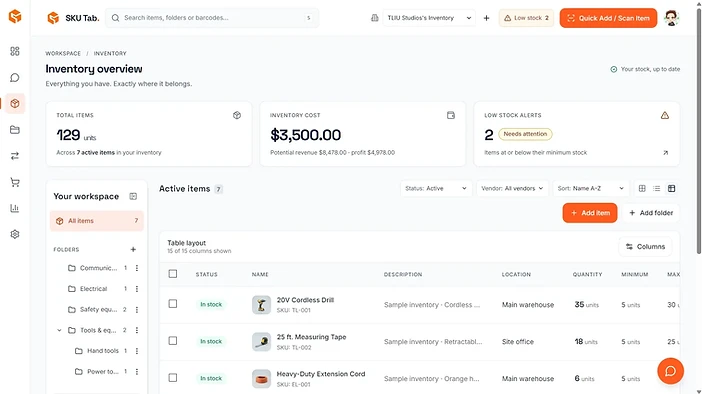
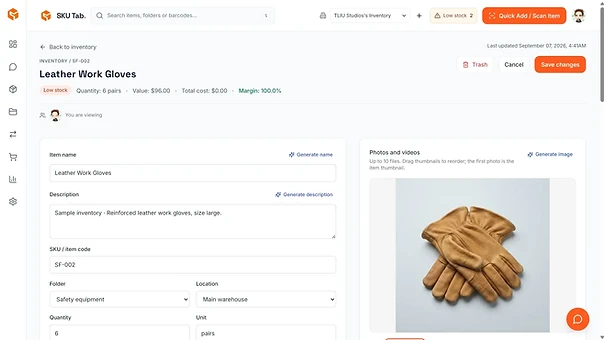
SKU Tab combines visual item records with practical inventory controls, giving small teams a shared source of truth without losing the simplicity they need.

Build a complete record for each product, supply, tool, or piece of equipment. Photos make items easy to recognize, while structured details keep purchasing, storage, and reporting connected.

Scan the right item, receive purchase orders, adjust quantities, and transfer stock between locations. Your team can see current levels and review activity from one organized workspace.
item lookup with barcodes
location and movement history
From the first scan to the final report, every tool stays connected to the same inventory.
Use a camera or barcode scanner to pull up the right item in seconds.
See quantities across warehouses, rooms, shelves, or job sites.
Record incoming stock and keep costs accurate as deliveries arrive.
Transfer multiple items and keep a permanent movement history.
Monitor stock value, margins, low-stock items, and activity at a glance.
Keep workspace conversations and item comments close to the work.
Replace scattered spreadsheets with a visual inventory workspace your team can understand. Organize everyday stock processes while preserving the details needed for purchasing, accountability, and growth.
Explore inventory use cases
Keep products, packaging, stock levels, and vendor details together as your catalog grows.
Know which tools you own, where they are stored, and what needs attention or replenishment.
Track quantities across stockrooms, shelves, job sites, and warehouses without another spreadsheet.
Create folders and locations that match the way your operation is organized.
Capture photos, SKUs, barcodes, costs, prices, and custom details.
Receive, transfer, count, and review inventory with your team.
Bring your items, locations, purchasing, and team activity into one organized workspace.
Create your workspaceInventory management software gives a business one place to record items, quantities, storage locations, purchasing details, and stock movement.
Yes. SKU Tab is designed to make day-to-day inventory clear for growing teams without requiring a complex enterprise system.
Yes. You can organize stock by locations and see where quantities are stored across rooms, shelves, warehouses, or job sites.
Yes. SKU Tab can use a camera or barcode scanner to help teams find and update the correct inventory item quickly.
Yes. Teams can create purchase orders, record incoming quantities, and keep receiving activity connected to the inventory items and destination locations involved.
SKU Tab can organize products, supplies, parts, tools, equipment, packaging, and other stock that your business needs to identify, locate, count, or reorder.
